Have you heard of Logstash / ElasticSearch / Kibana? I don’t wanna oversell it, but it’s AMAZING!
I’ll start with a screenshot. You know you want this. I have to blur a few things to keep some 53cr375 about my environment.
This is my configuration for collecting Windows event logs. I’m still working out the differences between the Windows XP, Server 2008R2, and Windows 7 computers I’m collecting logs from, but this has already proven very useful.
NOTE: If the screen width isn’t an exact multiple of 8, the video grabbed by dshow won’t play correctly in VLC. It will look garbled like black with diagonal lines.
For example: my laptop’s resolution is 1366×768. 1360 is a multiple of 8, but 1366 isn’t. It wasn’t until I had dshow scale the output to 1280×720 that I was able to get usable video into VLC.
Now that I can view the dshow video without trouble, I’m ready to encode to h.264 and segment for HLS.
VLC_Desktop_Stream.bat
[text]
@echo off
rem Start Stream
del /q C:xampphtdocsstream*
"C:Program Files (x86)VideoLANVLCvlc.exe" -I dummy dshow:// :dshow-vdev=screen-capture-recorder :dshow-adev=virtual-audio-capturer :dshow-aspect-ratio=16:9 vlc://quit –sout=#transcode{width=1280,height=720,fps=10,vcodec=h264,venc=x264{aud,profile=baseline,level=30,keyint=10,ref=1},acodec=mp3,ab=96}:std{access=livehttp{seglen=1,delsegs=true,numsegs=5,index=C:xampphtdocsstreammystream.m3u8,index-url=http://192.168.5.55/stream/mystream-########.ts},mux=ts{use-key-frames},dst=C:xampphtdocsstreammystream-########.ts}
[/text]
Note: Some devices honor the video stream’s stated aspect ratio, even if the video dimensions are different. My screen is 16:10, but I’m smooshing to 16:9. To make this work correctly, I had to specify the dshow aspect ratio as 16:9. No amount of fussing with it on the transcode side will fix this. It defaults to 4:3.
The simplevideoplayer example will play HLS and is simple enough for this.
RokuSDK_v41.zipexamplessourcesimplevideoplayer
Comment out the other video source lines in appMain.brs and change the URL under Apple’s HLS test stream to your local webserver.
Note: For some reason, this did not play unless I had srt = “” set.
appMain.brs
[text]
‘Apple’s HLS test stream
urls = ["http://192.168.5.55/stream/mystream.m3u8"%5D
qualities = ["HD"]
streamformat = "hls"
title = "Apple BipBop Test Stream"
srt = ""
[/text]
I am a huge fan of Torque OBDII reader for android (Torque Pro) with Torque Track Recorder. It kinda sucks on my original Motorola Droid so I wanted to get it working on my Nexus 7. Which got me really excited about hooking up a webcam to my nexus 7. (I currently have an iPhone 4 so that’s not an option)
# format, cameraName=device,direction,orientation,type
# type can be ‘stereo’ for stereo capable, ‘mono’ for not stereo capable,
# ‘usb’ to enable searching for a usb device and where to put it in the list
# if found. Lines must be shorter then 256 characters
version=1
camera0=/dev/mi1040,front,270,mono // front camera
usb=/dev/video0
Motivation:
My fiance and I have a stack of DVDs. They’re dusty and inconvenient. I wanted to rip them to my network storage so I can easily watch them from my Boxee Box. It’s not that I’m lazy, but I hate doing repetative things if I can automate it.
Overview:
I’m using Perl with Win32::SerialPort to control the autoloader. I’m using Win32::DriveInfo to get the volume name of the DVD. I’m using TMDB on the off chance the volumename will pull up the movie. I’m using DVDFab 8 to rip mainmovie to an ISO file. I’m using Handbrake to encode to iPad preset. In my testing, this looks just as good as the ISO file and uses only 20-30% of the space.
To use I batch together either all movies, or all TV shows. I rip my movies into my mapped network drive, V:queue and my TV shows into V:TV_queue
I have my faster computers actually do the encoding. Multiple computers. I map the V: drive to the same fileshare. I encode my movies to V:Encoded and my TV shows to V:TV_Encoded
ripinator.pl
Main program. It requires gripper, ripper, and traycmds. I broke this into multiple pieces to make it easier for me to keep track of.
Enumerates all CD/DVD drives attached to the computer and iterates through them probing the gripper arm to each tray. If a tray is detected, the drive number and drive letter are noted.
It then checks the levels of the bins.
If there are discs in the desginated input bin, it will load them into the drives and start the ripper.pl script
If there are discs done ripping, it will unload them into either the reject bin, or the output bin, depending on the exit code
This will continue until either something crashes, a disc is completely unreadable, or there are no more discs left to rip.
gripper.pl Description:
Contains subs Required Setup:
Set COM port on line 218
getVersion()
Returns the version of the autoloader’s firmware
getSerialNumber()
returns the serial number of the autoloader
goHome()
moves the gripper arm to the top of the unit
getStatus()
Queries the autoloader’s status. See command notes for more info
getPosition()
Gets the current position of the gripper arm
getBin($bin)
gets a disc from the specified bin
putBin($bin)
puts a disc in the specified bin
getDrive()
gets a disc from the specified drive
putDrive()
puts a disc in the specified drive
probeTray()
probes the gripper arm to the disc tray, returns drive number
sendCommand()
sends a command to the autloader. see command notes for more info
traycmds.pl Description:
Contains subs Required Setup:
Put nircmd in C:nircmdnircmd.exe
@allDVDdrives = closeAllDrives()
Closes all CD/DVD drives. Returns an array of all the CD/DVD drives attached to the computer.
closeDrive($drive)
Closes the specified drive
openDrive($drive)
opensthe specified drive
getVolName($drive)
gets the volume label of the specified drive
ripper.pl Usage:
perl ripper.pl $drive $tray Description:
Rips DVD to specified location. makes and removes lock files for ripinator. Looks up TMDB, if available, uses moviename and year for filename, if not, uses volumename. Required Setup:
Get an API key for TMDB
set $dest_dir where you want ripped DVD ISO files to be stored
set $dvdfab as path to dvdfab.exe
enter TMDB API kay on line 96
cmdtest.pl Usage:
perl cmdtest.pl !e1C Description:
Allows sending commands to the autoloader
encodemovies.pl Usage:
perl encodemovies.pl Description:
Encodes ISO files to iPad preset m4v with handbrake.
Required Setup:
Set machine name, path to handbrake, source and destination folders.
encodetv.pl Usage:
perl encodetv.pl Description:
Encodes ISO files to iPad preset m4v with handbrake. Splits each title into a separate file. Required Setup:
Set machine name, path to handbrake, source and destination folders.
Back Story:
A few years ago, we had a Rimage DVD production robot at work. I dubbed it Trogdor the Burninator. Rimage had some pretty scummy practices… The ink cartridges are standard HP cartridges, but had a little tag in the label that will keep the software from loading if you don’t buy the Rimage branded cartridges. I’m sure they would have gouged even more if they could think of a way to do it. So we replaced it with a newer, nicer one from Primera. It was an improvement in pretty much every way. I got the old one since no one else wanted it. SCORE!
I took it up as a project again. I had saved the old software from Rimage and was able to get it to run for 30 days between wiping and reloading the computer it was attached to. This was enough time to determine that the connection between the printer and the RAS 13 autoloader was RS232 serial. I sniffed the traffic between long enough to figure out which commands did what, and what replies meant. This is by no means definitive, but it’s enough to use an otherwise useless piece of equipment.
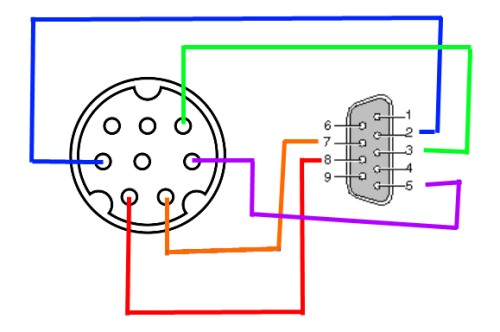
I had popped the side off my RAS 13 and looked at the port that had been used to control the autoloader. It was a mini din 8 pin port. It was connected to a serial level converter chip. I took this as a sign it used RS232. There were 4 pins actually connected to the chip, 1, 2, 3, and 8. Pin 5 was connected to ground. Picture: Control PCB inside RAS 13
Some trial and error with the breadboard. Picture: Messy Breadboard
Once I had the proof of concept, I wanted to order some connectors to make it a little tidier.
Diagram of cable connection. Note: both ends are looking into male connectors. Check out my Skills of an Artist!
Connectors are pretty easy to find. I ordered from mouser and sparkfun since I was ordering other stuff too.
I’m using DVDFab to rip since it doesn’t seem to get tripped up as often with weird copy protection crap.
Luckily, Win32::DriveInfo will give me the volume name of the DVD. If I get time, I’ll rewrite so it checks for duplicates and appends the date&time to get a unique filename for output. It’s a little annoying when 3 discs are all named “DVD_VIDEO”.
I’m not setting it as an autorun action for the DVD drive because I’m going to call it from the ripinator script.
Each command starts with the nonprintable ascii character ESC (x1B) and ends with a capital C.
Each reply starts with the nonprintable ascii character ESC (x1B) and ends with EOT (x04). Since that looks pretty ugly in a terminal, I replace ESC with a + sign and the EOT with an = sign.
In the known command list, the commands aren’t indented and the known replies are indented.
I was lookin to set up some digital signage, nothing too fancy, basically a scaled up digital picture frame with a few extra features. It’s also important that it works well stand-alone.
One of the drawbacks of living outside of city limits in Iowa… Internet connectivity is an issue. Century Link (formerly Qwest) is the telco for the area and our ISP. The service has never been stable, or even close. If good fortune was smiling upon us, it would stay connected for 6 hours or so. I think it was more normal to get 15-90 minutes of internets at a time. A tech did look at our connection, and things have improved, but it’s still not great.



 Raging Computer